By the end of this page the bot will go to town by itself when potions run low or the bag fills up, buy potions, repair your gear and return to the hunting spot. Save your hunting spot first: the hunting area guide shows how.
Set up the town once
The settings are on the Town page, in the Scroll town cycle box. The supported towns are Hotan, Jangan, Donwhang, Constantinople and Samarkand.
- In the game, bind your recall to one of these towns.
- Stop the bot and pick your town in the Town list at the top of the town box. That sets up the arrival point and the four services; you do not have to be in town.
The bot saves the town’s arrival point, where its return scroll always lands. It then fills Warehouse, Potion merchant, Repair merchant and World statue / teleport from the server’s NPC data, each as a spot a few metres from the NPC. Picking the town that is already saved fills only what is empty, so a point you adjusted stays. Picking another town replaces all five points. Redo all automatically replaces every saved point. Auto-set town services fills what is missing for the town you are standing in.
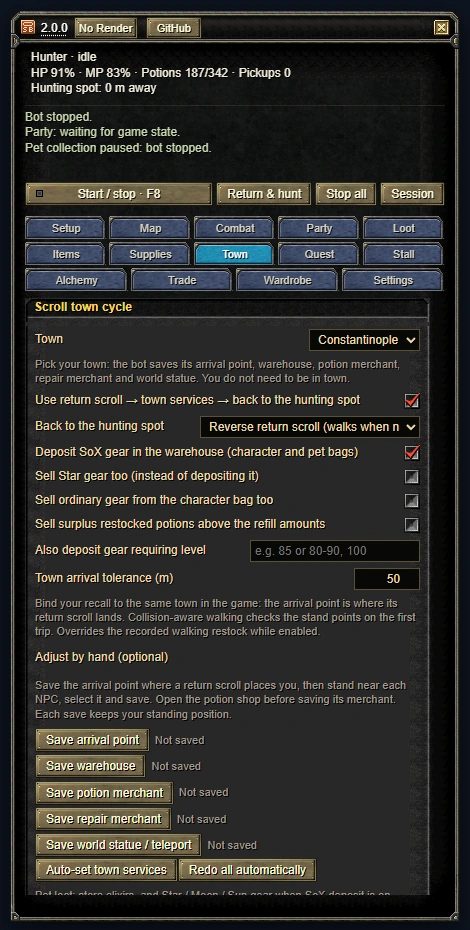
To do it by hand, stand near each service, select the NPC and save its point. Open the potion shop before you save its merchant. Points you save by hand override the automatic ones.
Potions and the way back
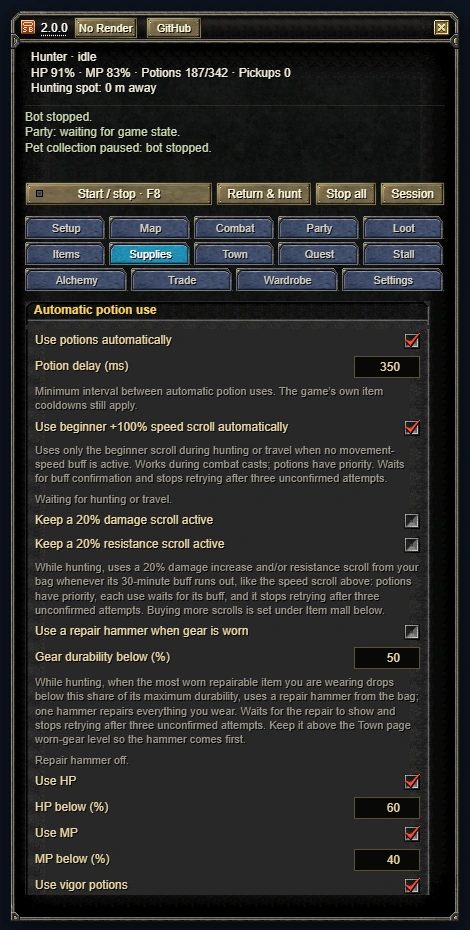
- Tick Buy HP and/or Buy MP and set the low-stock thresholds. HP refill to and MP refill to are potion counts, 100 HP and 300 MP by default. They apply to every trip, including full bags and revival. Town buys X-Large potions.
- Tick Use return scroll → town services → back to the hunting spot.
- For Back to the hunting spot, choose Reverse return scroll (the default) or Walk.
Before you start, carry gold, spare return scrolls, reverse scrolls (if you chose reverse) and at least two free slots in your character bag. Then start the bot.
A trip goes like this: recall to town, the warehouse, the potion merchant, the repair merchant (repairs, and sells what the pet carried), then a reverse to the last return-scroll point. With Sell ordinary gear from the character bag too on, the repair merchant comes before the potion merchant, and first of all when the bag is full. With Walk, or when you have no reverse scroll and could not buy one, the bot skips the world statue and walks back to the saved hunting spot. If the walk cannot reach the spot, the bot stops with a message.
What starts a trip
These are listed under Go to town when…:
- Always: the character bag has one free slot or less, potions, vigor potions or pills reach their low-stock numbers (Supplies), or arrows and bolts reach theirs (Town).
- Return when pickup pet is nearly full, with Pet free slots ≤.
- Weapon is broken: the equipped weapon is at 0 durability. On by default.
- Gear is worn: the most worn repairable item you wear has dropped below Gear durability below (%) of its own maximum, 15% by default. Off by default.
- No XP for a while: no experience for No XP for (minutes), 10 by default. Off by default.
- On a timer: every Every (minutes), 60 by default. Off by default.
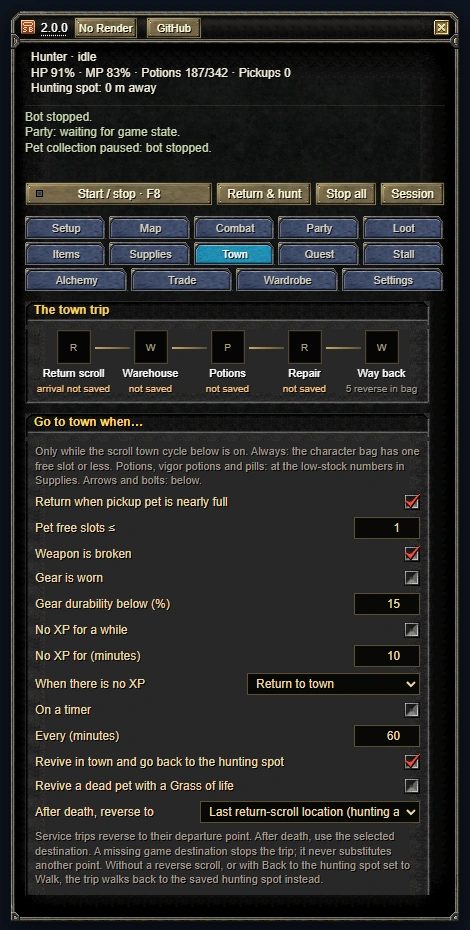
The XP and timer clocks run only while hunting and restart with every trip. All of these need the town cycle on.
After a death
Leave Revive in town and go back to the hunting spot on. The bot revives, finishes the town services and reverses back. Last return-scroll location (hunting area) is the default. Death location is used only if you died inside the hunting area.
If it goes wrong
Every trip writes its reason to the Activity log, for example “Town trip started: potions running low”. The log is in the Wide window (Wide in the title bar).
If a trip stalls on the way to a merchant, the status line names what it is waiting for:
- “Waiting for game collision data” or “Waiting for collision coverage”: reload the game and try again.
- “No walkable route found”: save that service point again. Stop hunting, stand on open ground a few steps in front of the NPC, select the NPC and press its Save button.
- “Blocked route (no progress for 20 s)”: check that the character is not stuck behind another player or an object.
If the game never answers a sale, purchase or warehouse move, the bot never sends the same command twice. A second time in the same trip stops it with “Town cycle stopped: Inventory transaction timed out. No repeat command sent.” Reload the game and check your bag before you hunt again.
Still stuck? Use Settings › Send bug report, copy or save the report and attach it to a GitHub issue. Nothing is uploaded. Common questions are on the FAQ page.