By the end of this page the bot will be set up to enhance an item to the plus you choose. Have the item, your elixirs and, if you want them, lucky powder and stones ready.
The risks first
Any attempt can fail. A failed enhancement can reduce the +, damage the item or destroy it. The bot keeps going until the target, the attempt limit or the end of your materials, so enter both numbers on purpose.
To stop, use Stop alchemy, Stop all or F8. They prevent further attempts, but an attempt that has already been sent can still finish. If a result cannot be confirmed, the bot pauses and does not retry.
Start an enhancement
- Stop hunting and travel, and put the item in your bag. It can be a weapon, a shield, an armour piece or an accessory.
- On the Alchemy page, select the item.
- Set Target +.
- Set Maximum attempts. The limit is 9999.
- Choose an elixir. The list shows the elixirs for that kind of item.
- If you want, switch on lucky powder of the matching degree and set Lucky powder from + to say from which plus it is used.
- Press Start alchemy.
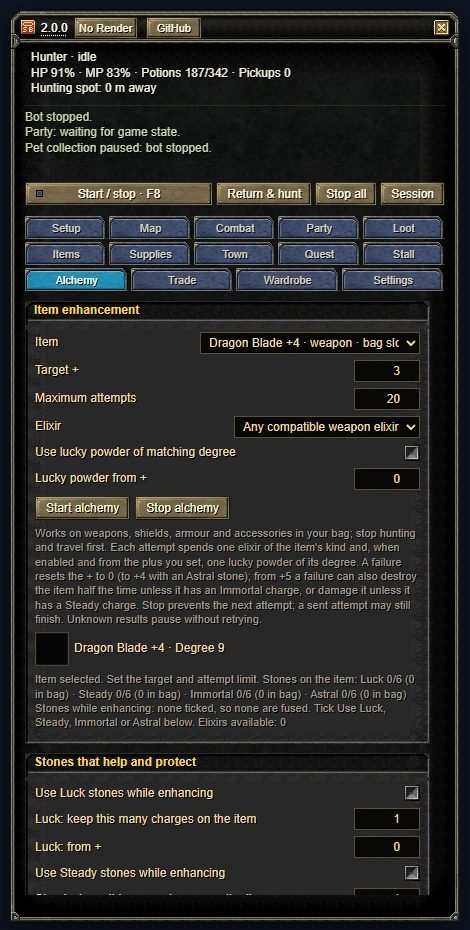
The tab shows the chance of the next attempt and how many elixirs you should expect to need. Both come from the server’s own data. Powder and Luck are counted the way the server counts them, but skill and avatar bonuses are not. A Results panel shows attempts, successes, failures, destroyed items, the highest plus, what was used, and a log of every attempt and fusion.
Stones that help and protect
Under Stones that help and protect, tick Use Luck / Steady / Immortal / Astral stones while enhancing for the helpers you want. Two settings go with them: how many charges to keep on the item (1 to 6) and the plus each stone is used from. The defaults are Luck 0, Steady 5, Immortal 5 and Astral 4.
Before every attempt at or above that plus, if the item has fewer charges than you asked for, the bot fuses one from a stone of the item’s degree in your bag. Fuse stones now ignores the plus and only fills the charges.
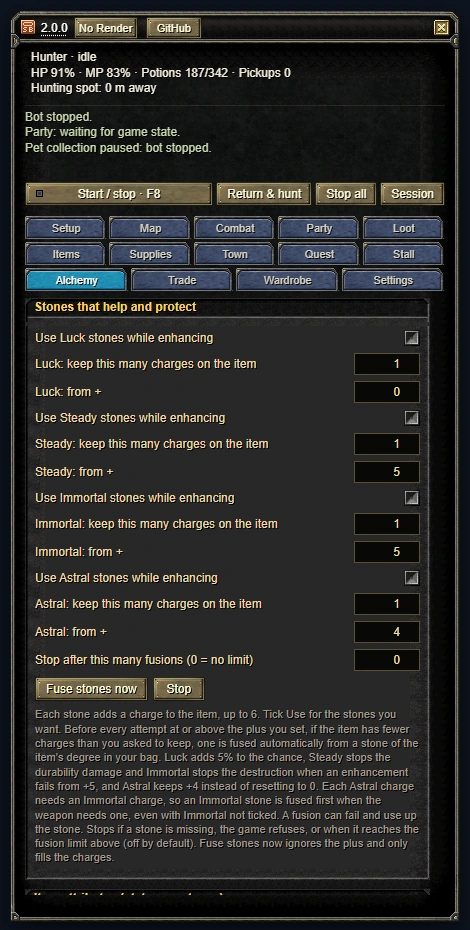
Each stone adds 1 to its attribute:
- Luck raises the enhancement success chance.
- Steady stops durability damage.
- Immortal stops the item being destroyed when an enhancement fails.
- Astral stops the + from resetting, from +4.
Only Astral stops the + from resetting. Luck, Steady and Immortal do not.
The Immortal and Astral rule
The game takes an Astral charge only while the weapon has more Immortal charges than Astral ones. So when the weapon needs it, the bot fuses an Immortal stone before an Astral one, even below Immortal’s own plus and even if Immortal is not ticked. With no Immortal stone in your bag, it stops and says so.
The stone must be of the item’s degree and in your bag. Adding a kind the item does not have yet needs a free magic option slot. The bot fuses only what is missing. A failed fusion uses up the stone and changes nothing, and the bot carries on. It stops if a stone is missing, if the game refuses, if the counts cannot be read, or at Stop after this many fusions (0 by default, which means no limit).
Item attributes
Under Item attributes (stat percentages), pick the lowest percentage you want for each stat of the selected item. For a weapon the stats are Phy. reinforce, Mag. reinforce, attack rating, Phy. and Mag. attack power and critical. Armour, shields and accessories have their own list.
Press Fuse attribute stones and the bot fuses attribute stones of the item’s degree, working down the list, until every picked stat reaches its target. A successful fusion rolls the stat again, so it can come out lower, and it can re-roll another stat too, so the bot keeps checking all picked stats. The stone chance is 50% before bonuses and the high steps (80%, 100%) are rare, so set Stop after this many attribute stones (100 by default). A stat with no stones left of the item’s degree is passed over and the log says which.
If it goes wrong
- If the bot stopped, read the Results log and the status line. A missing stone, a refusal by the game or counts that could not be read all stop it, and it says so.
- If your stones are not in the bag, a town trip may have put them in the warehouse. Take them out and try again. The town trip guide explains what trips do with stones.
- If something behaves in a way you do not understand, use Settings › Send bug report, copy or save the report and attach it to a GitHub issue. Nothing is uploaded. Common questions are on the FAQ page.